Specify and procure FF&E and OS&E at scale with Fohlio today. Empower teams to move faster and improve their operational workflow with specification, prototyping, procurement, collaboration, and analytics tools.
Interior design software is usually chosen based on the wrong criteria: the prettiest interface, the most familiar name, or whatever another firm happens to be using.
None of that helps you deliver projects faster, make fewer mistakes, or manage procurement with confidence.
The smarter way to choose software is to anchor your decision in the pain your team is actually experiencing. Not the surface-level pain, but the operational friction that slows projects down, creates rework, delays procurement, and undermines profitability.
Teams start looking for new software when something breaks — a spreadsheet fails, a spec gets rewritten again, a vendor ships the wrong item, or a fabrication team sends a list of missing details. At that point, the question becomes unavoidable:
What interior design software will actually support the way we work — including procurement?
Most tools look similar on the surface but solve completely different problems behind the scenes. Some are built for client billing. Some for pretty proposals. Some for drawings. And a very small group is built for FF&E and OS&E at scale.
This guide clarifies the landscape so you can choose the software that matches your workflow, your project types, and the operational pressures you’re really facing.
Why You Should Start With Pain (Not Features, Not Aesthetic, Not “What Everyone Else Uses”)
Most teams evaluate interior design software the wrong way. They look at screenshots. They compare feature lists. They default to whatever another firm “seems to be using.”
But the only metric that actually predicts whether a platform will work for you is this:
What problem is costing you the most time, money, accuracy, or credibility right now?
Design software is not decoration. It is infrastructure. And infrastructure only succeeds when it is built around your pain points.
When you anchor your search in pain, you quickly see the real differences between tools. Some solve billing. Some solve client communication. Some solve modeling. But only a few solve the operational gaps that quietly drain margins, delay schedules, and force your team into spreadsheet gymnastics.
Starting with pain keeps you honest. It cuts through the noise. And it ensures you choose software that strengthens your entire workflow, not just the part that looks good in a demo.
Read: How to Streamline Workflows — From Specification to Procurement and Contracting [Case Study]
Pain 1: “Our process doesn’t fit the software”
Most interior design software is built around a neat, linear workflow:
select item > send proposal > invoice > order > done.
But anyone managing FF&E or OS&E at scale knows real projects don’t behave this way.
- Hospitality projects cycle through phases and often loop when pricing or availability changes.
- Retail rollouts move fast and in parallel.
- Healthcare projects hinge on compliance reviews.
- Multifamily work relies on repeated unit types and model kits.
- Renovations shift constantly based on site conditions.
In reality, your workflow changes by project type, market, vendor constraints, and client expectations.
Some projects move in a straight line. Others pause and restart. Some run design and procurement side by side. Others jump backward because of lead times, value engineering, or unexpected changes.
Cookie cutter software can’t handle this. It forces your team to fit a predefined sequence instead of supporting the way your projects actually unfold.
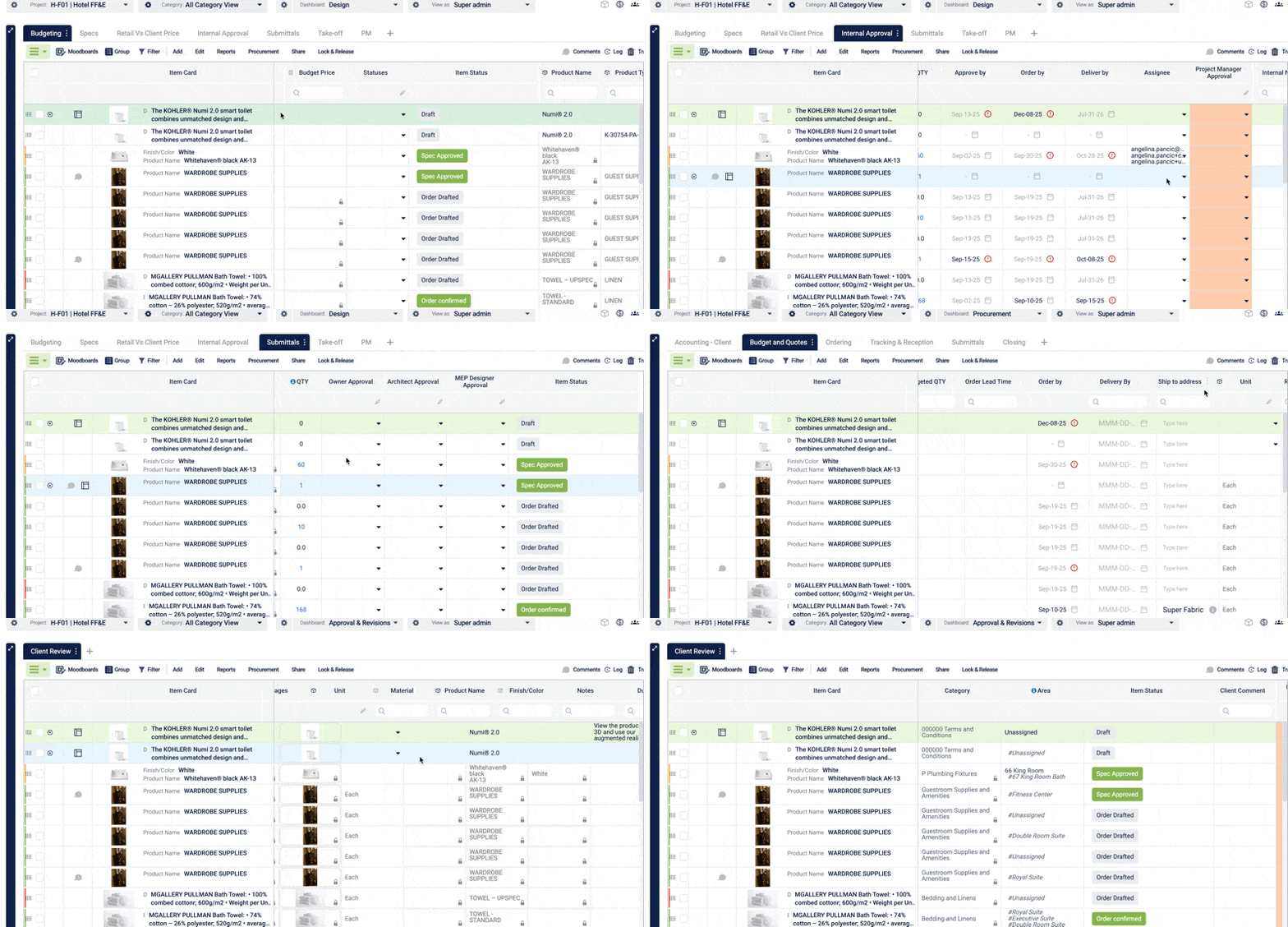
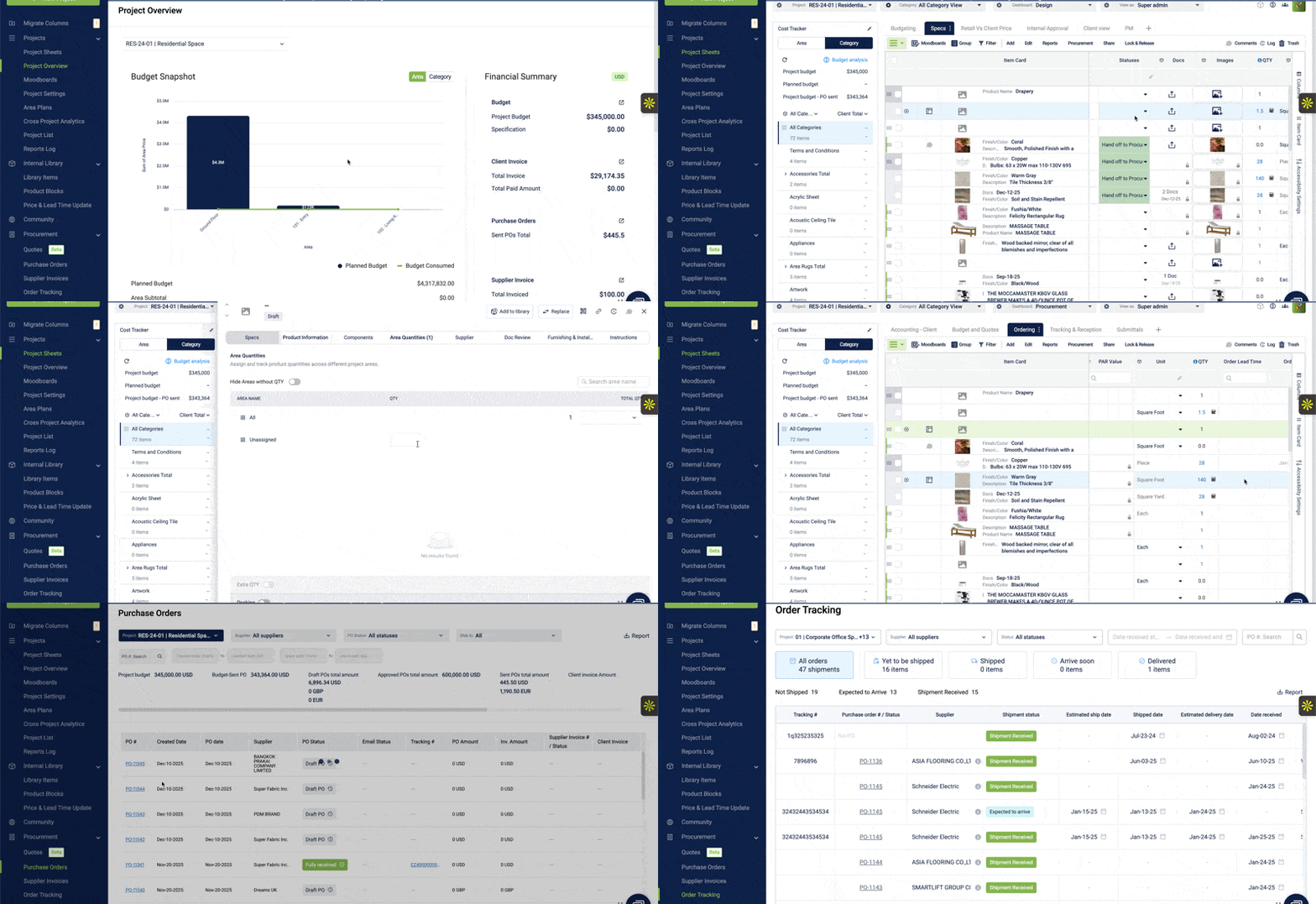
In Fohlio, projects are organized by phase.
Each phase can have its own tabs, with dashboards tailored to different team roles. Information stays grouped by where it belongs in the process, rather than scattered across views or duplicated elsewhere.
This makes it easy to move between phases, understand which items are active at each stage, and see exactly where something sits without extra coordination.
A scalable platform must flex with every project’s operational shape.
It should support non linear progress, allow teams to work in phases or in parallel, adapt as vendor data evolves, and keep design, procurement, operations, and clients aligned even when each group moves at a different pace.
Software should follow the reality of the work, not the other way around.
Pain 2: “We manage hospitality, retail, healthcare, multifamily — all with different workflow needs”
Your software must support different project types, not force everything into one mold.
Interior design teams rarely work in a single vertical.
More often, they are juggling multiple project types at once. Each one comes with a different operational reality.
- Hospitality involves multi building packages, long lead FF and E, and regional alternates.
- Retail requires rapid rollouts, tight brand standards, and market by market variations.
- Healthcare hinges on compliance, approvals, and complete documentation.
- Multifamily is built around repeatable unit types, model kits, and cost control.
- Corporate and senior living add preferred vendors, procurement controls, phased renovations, and accessibility requirements.
Most interior design software ignores these differences.
It treats every project as if it were a simple residential job with one path from selection to purchase.
That is where the friction starts.
Teams duplicate work.
Processes splinter.
Spreadsheets fill the gaps.
Documentation gets rebuilt on every project.
Not because the team is disorganized, but because the software cannot accommodate how different verticals actually operate.
A platform built for scale should support multiple project types without forcing separate systems, duplicated data, or improvised templates.
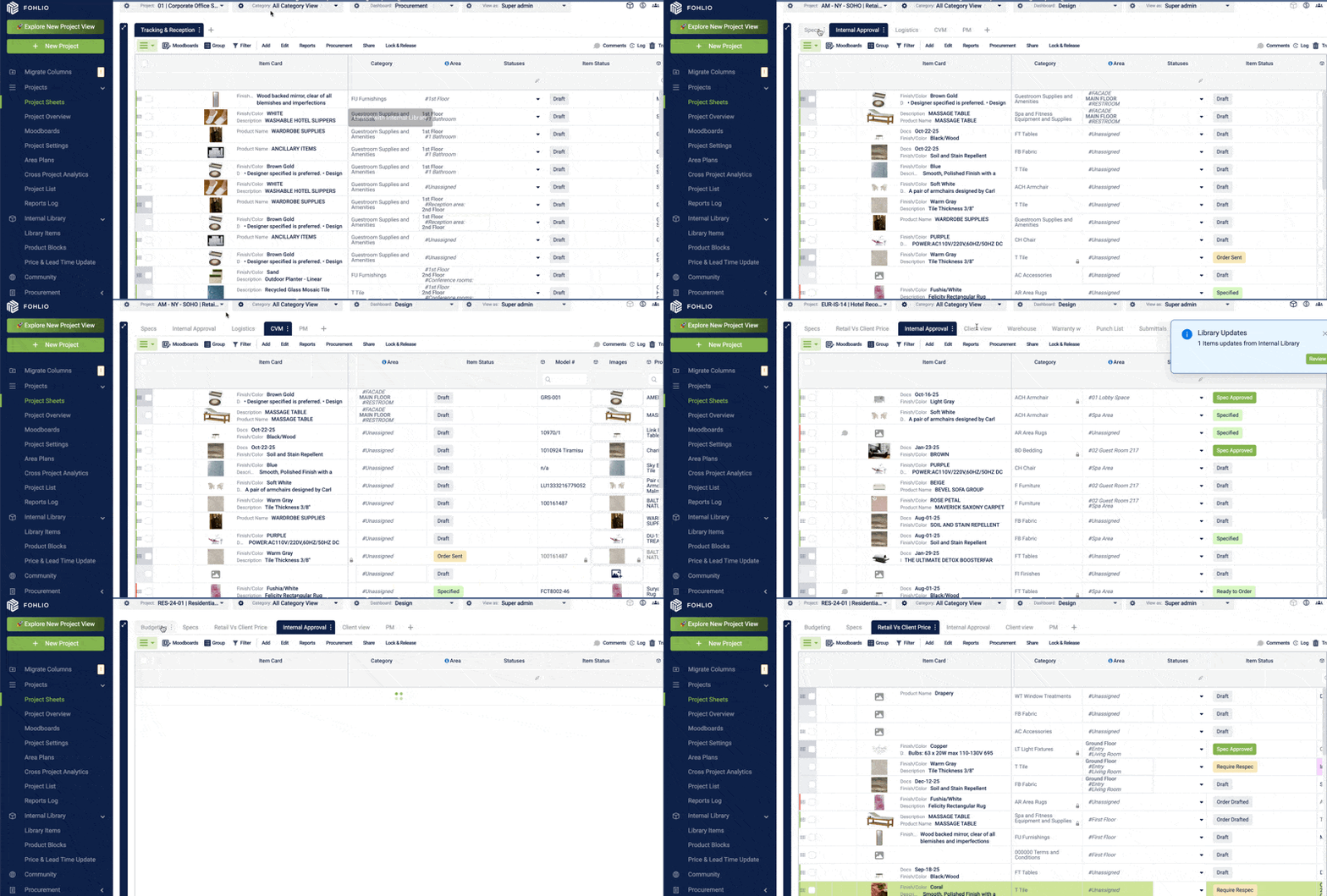
In Fohlio, project phases are configurable.
Phases can be adjusted by project type and by role, so each team sees a workflow that matches how that project actually runs. The structure adapts to the work, rather than forcing every project into the same sequence.
This allows project sheets to follow the right flow for each project type, without adding work or creating confusion.
It should let you manage hospitality one way, retail another, healthcare a third, all within the same underlying structure.
One platform should fit the entire portfolio, even when that portfolio spans very different operational demands.
Read: Hidden in Plain Sight: 6 Pitfalls That Ruin Your Interior Design and Procurement Projects - This article breaks down common process challenges that cost time and accuracy — and explains why traditional tools often fall short.
Pain 3: “Fabrication sends back questions because specs are missing details”
Specifications often look complete in the system. There is an image, a description, and a cutsheet attached, so the item feels ready.
Fabrication is where gaps surface. Missing dimensions, unclear components, outdated finishes, incorrect hardware details, or the wrong cutsheet version quickly turn into clarification requests.
Production pauses while answers are tracked down. Vendors wait. Items sit in holding. Timelines tighten for reasons that have nothing to do with complexity.
This is the cost of incomplete specifications.
A fabrication ready specification ensures that critical details are defined before anything moves forward, reducing back and forth and protecting schedules.
Specifications should support fabrication, not create friction.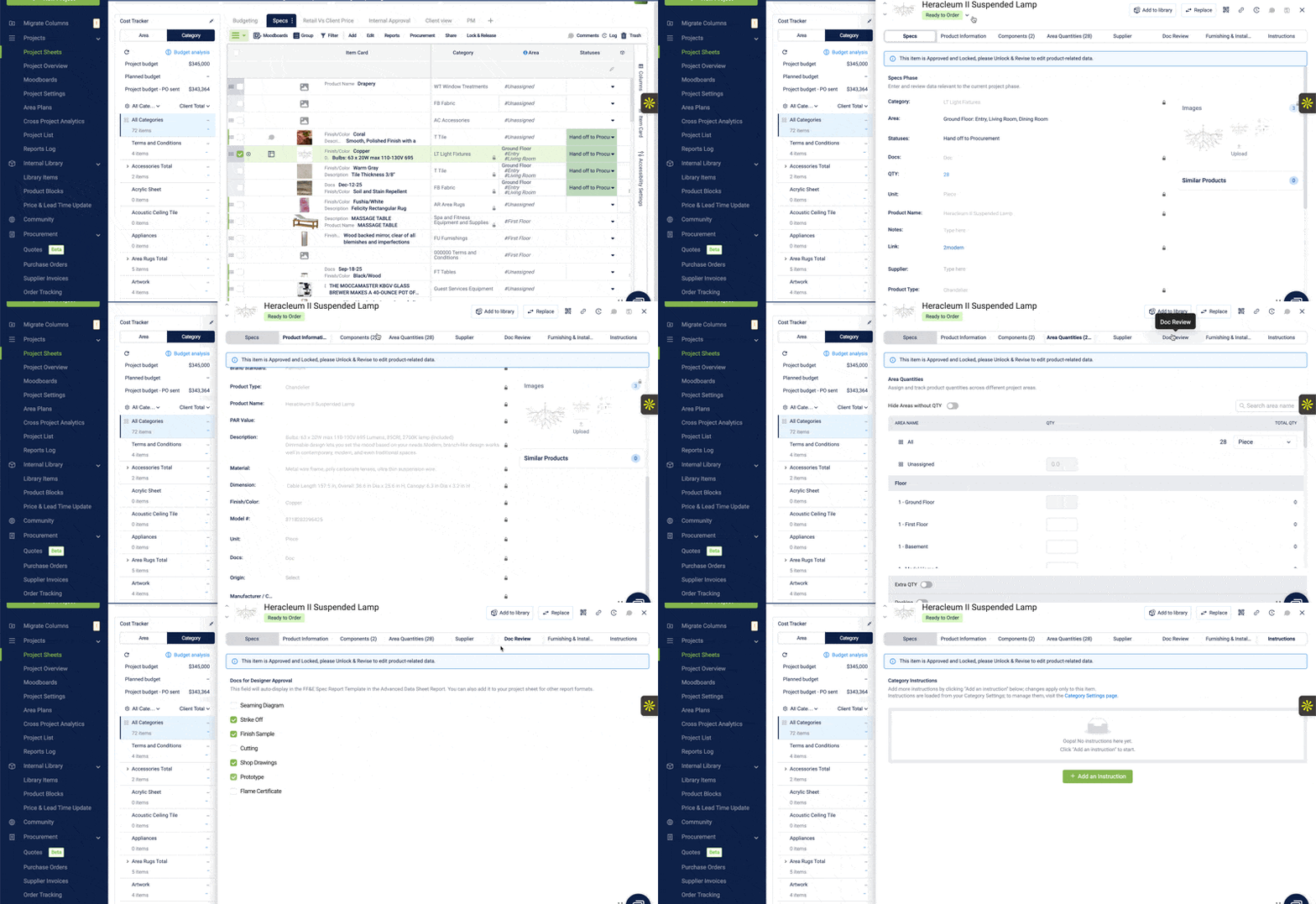
Pain 4: “We aren’t leveraging preferred vendors or rebates across projects”
You need to re spec from approved vendors and see spend across your portfolio.
Large organizations depend on preferred vendors, negotiated pricing, and rebates to control cost. But most interior design software treats every specification as a new decision. Items are re specified, negotiated pricing is missed, and rebate eligibility is lost because the system does not support preferred sources.
Spend fragments across projects.
Pricing becomes inconsistent.
Procurement loses leverage.
This is how organizations overpay without realizing it.
A platform built for multi project work should make preferred vendors the default. It should support re spec from approved catalogs and provide visibility into total spend and vendor performance.
Preferred vendor visibility is not about efficiency. It is about control.
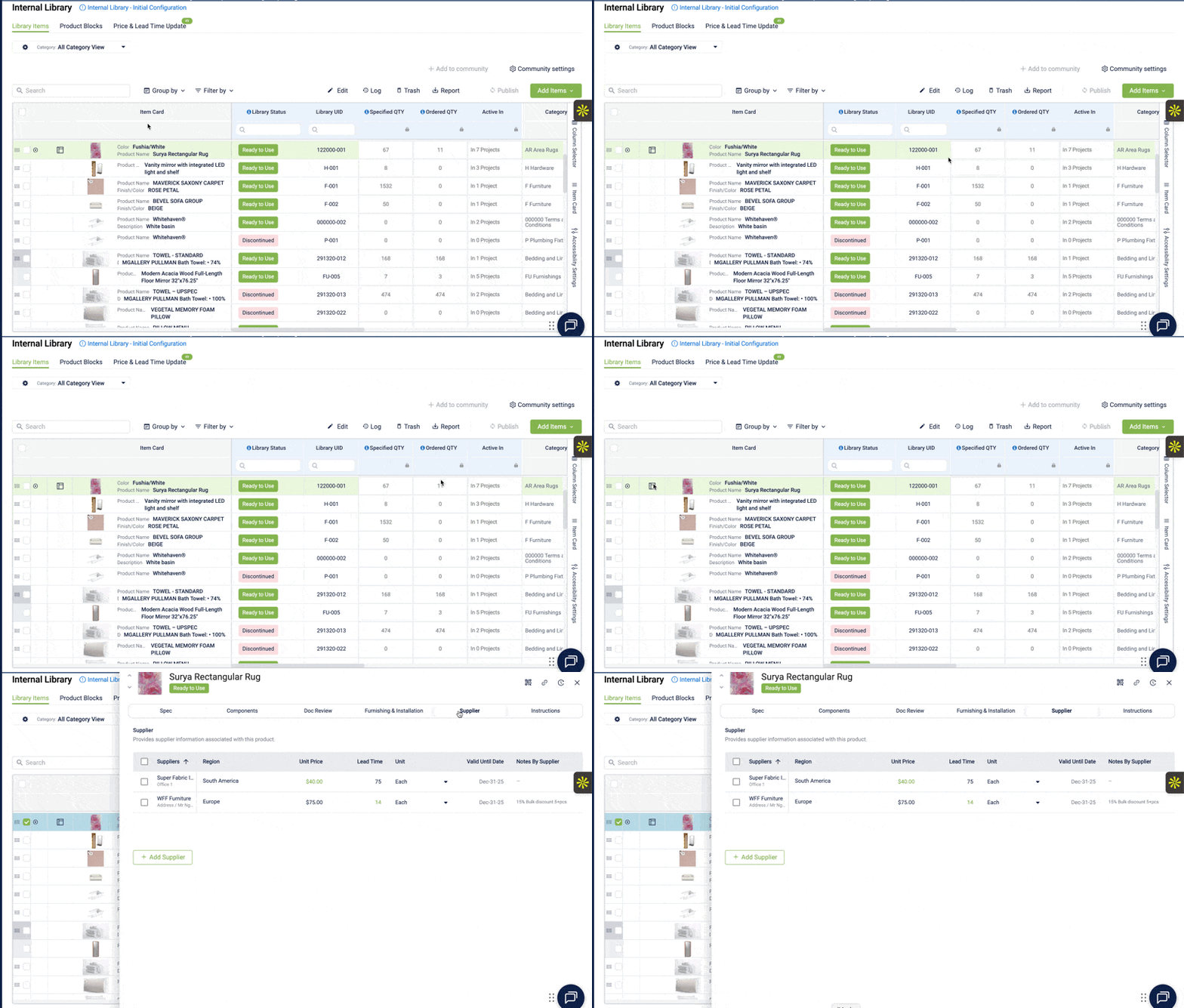
In Fohlio, vendor and item data carries across projects.
Teams can see vendor information in one place, track how often items are re specified and purchased, and understand patterns over time rather than project by project.
That visibility becomes leverage when negotiating bulk orders, because decisions are based on real usage, not assumptions.
Read: Interior Design Budgeting: How to Build Financial Control and Predictability Into Every Project
Understanding the Interior Design Software Landscape
Interior design software is often discussed as if all tools solve the same problem.
In reality, they are built for very different stages of a firm’s growth and very different operational needs.
Some tools focus on client communication and billing. Others support drawings and visualization. A smaller group is built to manage specifications and procurement once projects, vendors, and standards begin to scale.
Understanding where each category fits makes it easier to choose software that supports how your team actually works, rather than forcing your workflow to adapt to the tool.
.png?width=675&height=563&name=Interior%20Design%20Software%20(4).png)
Comparison Table: The Entire Market In One Snapshot
This table integrates directly into the blog for clarity and decision making. It positions Fohlio first, without diminishing the value of other tools for the right stage.
Interior Design Software Comparison
| Tool |
Best Fit |
What It Supports Well |
How Needs Typically Evolve |
| Fohlio |
Multi project, multi site organizations managing FF and E, OS and E, and finishes |
Centralized specifications, shared libraries and standards, approvals, vendor context, and procurement workflows |
Used alongside design and billing tools as product data, standards, and purchasing coordination scale across projects |
| Ivy by Houzz Pro |
Solo designers and small residential studios |
Client communication, simple proposals, basic approvals, and purchasing |
As volume increases, teams often look for more consistency across projects, stronger vendor alignment, and more structured specifications |
| Design Manager |
Small to mid sized studios transitioning away from spreadsheets |
Financial documentation, invoicing, basic project organization, and simple specifications |
As project count grows, teams typically add shared libraries, cross project visibility, and more connected procurement workflows |
| Spexx |
Firms with long established specification processes |
Specification documentation and item tracking |
Over time, teams often explore more flexible workflows, modern collaboration, and closer alignment with procurement |
| GatherIt |
Design teams focused on early stage selection and presentation |
Collecting product ideas, organizing selections, and sharing concepts internally |
As selections move toward execution, teams usually introduce more structured specifications, approvals, and purchasing tools |
| Programa |
Architecture and interior teams focused on planning and early coordination |
Program management, space planning, requirement tracking, and early project data |
As projects progress, teams typically add systems to manage detailed specifications, vendor context, and lifecycle tracking |
| Revit / AutoCAD / SketchUp |
Design and architecture teams |
Drawings, plans, elevations, and 3D modeling |
Larger teams often layer in tools to manage product data, approvals, procurement, and cross project coordination |
When Specification and Procurement Become the Bottleneck
As firms move into multi project work, the tools they started with often stop keeping up.
Managing shared product libraries, maintaining standards across projects, coordinating vendors, and running procurement all introduce operational complexity that billing or visualization tools were never designed to handle.
At this stage, teams are not struggling with design execution.
They are struggling with alignment.
Information needs to carry across projects. Decisions need context. Procurement needs to stay connected to specifications as volume increases.
Tools built for simpler workflows begin to add friction instead of removing it.
This is usually when teams start looking for a system built specifically for specification and procurement.
Honest Recommendations by Firm Stage
Early stage firms typically move fastest with lightweight tools.
Client communication is straightforward. Project volume is manageable. Purchasing decisions are simple.
As firms grow, that balance shifts.
Shared libraries matter. Standards need to persist. Approvals become more structured. Procurement needs to stay connected to specifications.
This is when many teams add a dedicated specification and procurement platform alongside their existing tools.
Do You Need Specification and Procurement in the Same System?
Everything else flows from this question.
You need spec plus procurement when you have:
- More than one active project at a time
- Repeatable products or standards
- Multi building or multi store portfolios
- Alternates and value engineering
- Region specific variations
- Long lead items
- Structured approvals
- Renovations that require perfect historical documentation
If that describes your world, design only or invoicing tools will fail you. You will end up right back in spreadsheets.
This is exactly where Fohlio sits.
We centralize item data, specs, approvals, procurement, vendor communication, and cross project standards in one platform.
If your work is mostly one off residential, with simple quotes and straightforward purchasing, then Studio Designer, Ivy, or Design Manager will get the job done. They are not wrong tools. They are just not built for multi project operations.
Fohlio is the platform for teams who need order, accuracy, and repeatability across design, specification, and procurement. If you manage FF and E, OS and E, finishes, approvals, vendor relationships, and multi site rollouts, this is the system that replaces chaos with clarity.
Fohlio is not for everyone.
But when your projects get complex enough, it becomes the only platform that makes sense.
Specify and procure FF&E and OS&E at scale with Fohlio today. Empower teams to move faster and improve their operational workflow with specification, prototyping, procurement, collaboration, and analytics tools.
.png)