A Bill of Quantities is easy to start and hard to keep trustworthy. It's usually fine at 5 rooms. By 50 room variants, three vendors, and a round of finish changes after budget approval, most BOQs turn into a spreadsheet nobody fully believes anymore — quantities duplicated across tabs, a "final" version that isn't, and a procurement team, a packaging team, and an installation crew each working off a slightly different copy.
This piece is about what actually goes into a BOQ that holds up past that point — how to structure one so it serves procurement, packaging, and installation from the same source, how vendor comparisons and change tracking should work once the budget is locked, and where a spreadsheet stops being enough.
What a BOQ Is, and What It's Actually For
A Bill of Quantities is a document that lists, in detail, the materials, parts, and labor (and their quantities) required to carry out a piece of work. In construction it's traditionally used for tendering; in interior design and FF&E procurement, it plays a similar role — it's the document that turns a design intent into something a supplier can quote, a client can budget against, and an installer can execute from.
The complication in FF&E work is that a BOQ isn't really one document. It has to serve at least three audiences that want different things from the same data: procurement wants supplier, cost, and lead time; packaging wants carton counts and shipping units; installation wants room-by-room sequence and assembly notes. A firm should be able to build one BOQ and let each of those views pull what it needs — not maintain three separate spreadsheets that quietly drift out of sync.
Why This Gets Hard Fast at Scale
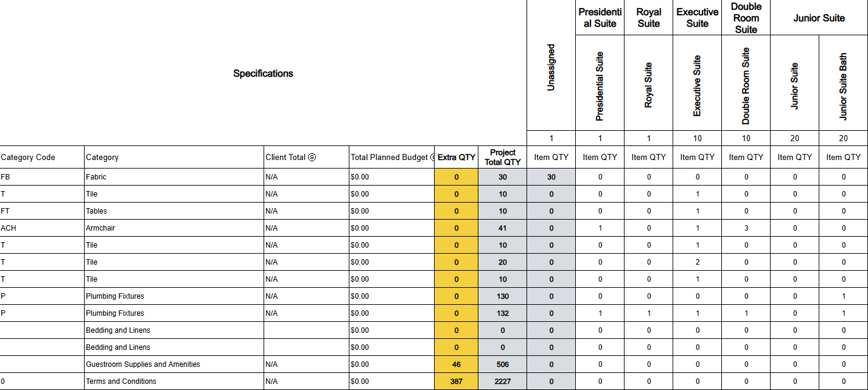
A single guest room is manageable in a spreadsheet. Fifty room variants across a hospitality renovation is where most manual BOQs start to break down — not because the math is hard, but because duplication creeps in. If the same bed frame appears as a separate line for a Corner room, a View room, and an ADA room, the BOQ balloons, and a single spec change now has to be hunted down and updated in three, four, or a dozen places.
The fix isn't fewer details — it's a different structure. A room matrix (showing which items go to which room type, and in what quantity) should stay the control document for quantities. The BOQ line items should exist once each, with quantities rolled up from the matrix rather than repeated by hand. That distinction — one line per product, not one line per placement — is what keeps a 50-room BOQ from turning into a 1,500-row spreadsheet nobody trusts.
From there, a BOQ built this way can generate three different reports without three different data sets:
- Procurement gets supplier, unit cost, and lead time, grouped by vendor.
- Packaging gets aggregate quantities grouped by packaging unit — how many cartons, how many per carton, what ships loose.
- Installation gets a room-by-room breakdown with assembly and site notes, with no cost columns to wade through.
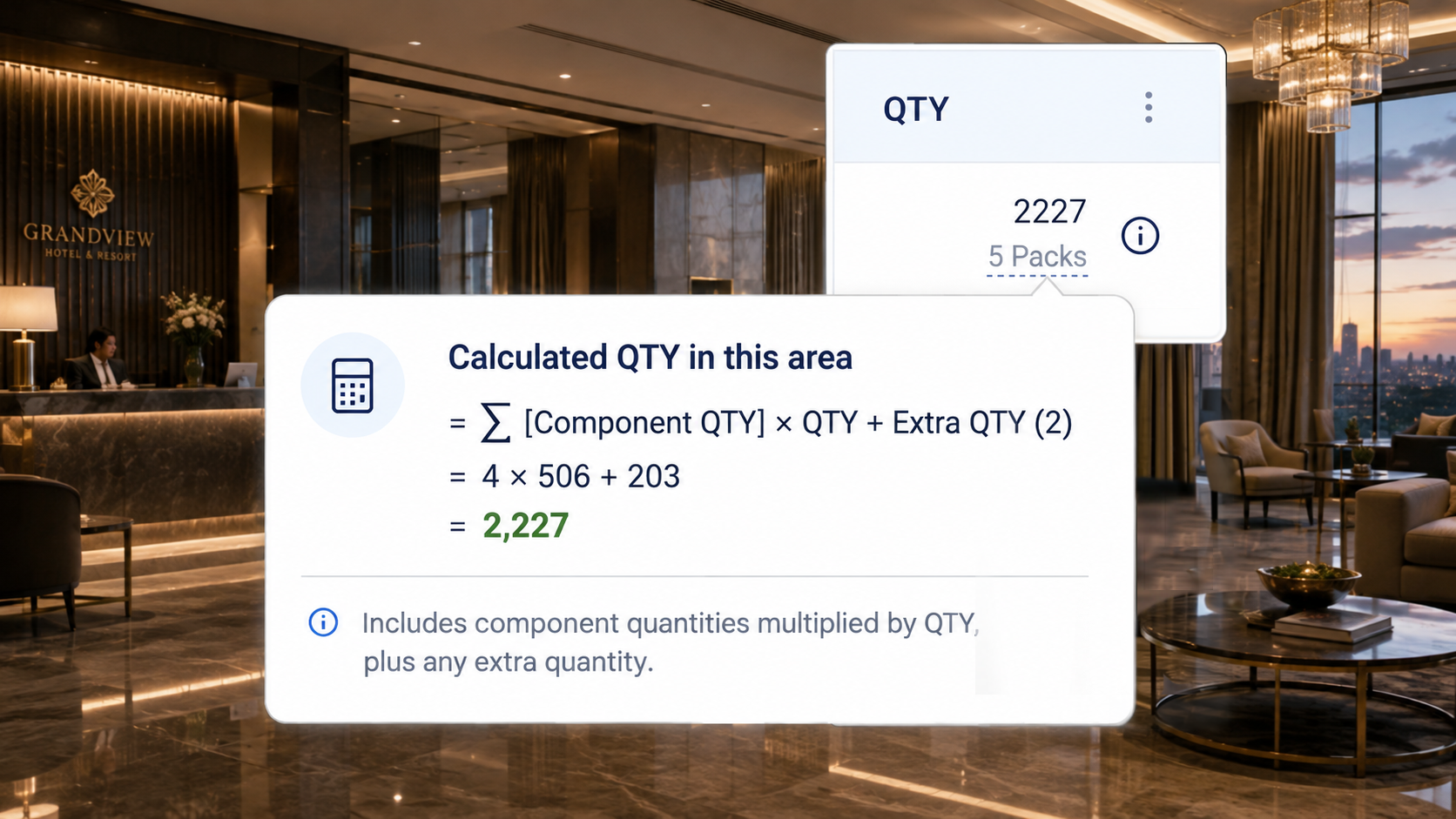
More on structuring specs this way, and why one source of truth matters more as project count grows, is in From Specifications to Procurement: How to Create One Source of Truth and How to Build a Centralized Product Library for Interior Design Firms.
Comparing Vendor Quotes Without Losing the Thread
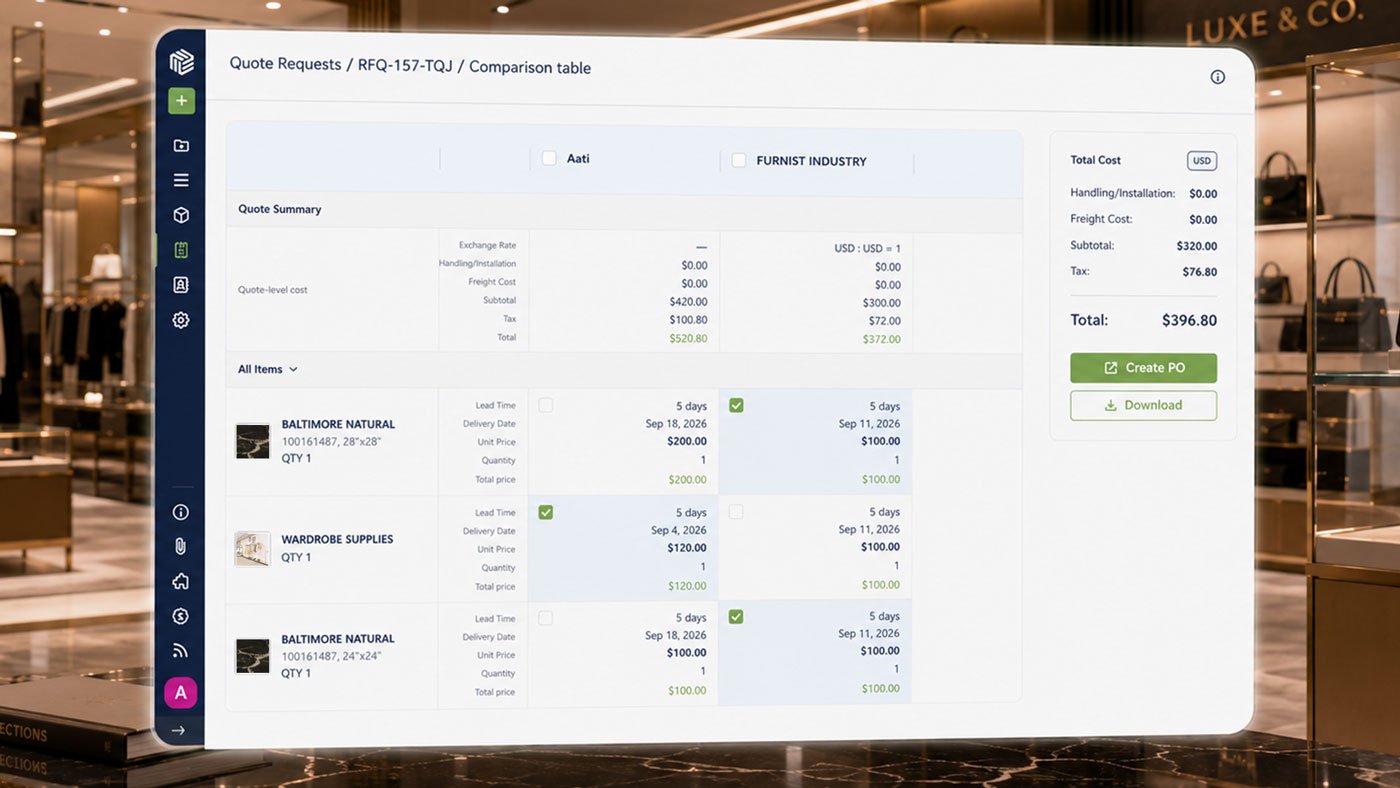
Once RFQs go out, the BOQ becomes the basis for comparison. A useful vendor comparison table sits item by item, with the full spec (product name, code, finish, dimensions) up top so there's no ambiguity about what's being priced, and each supplier's unit price, freight, lead time, and total lined up next to it.
The point isn't to always pick the cheapest quote. A supplier with a higher unit price but a shorter lead time might be the better call for one line item, while the lowest bidder wins on items where timeline isn't tight. What matters is that the choice — and the reasoning behind it — is documented at the line-item level, not buried in an email thread. That record is what you pull out when a client asks how a cost decision was made.
Price Isn't the Only Number That Decides a Quote goes into how quantity, delivery date, and price should all factor into that comparison.
Keeping an Audit Trail as Specs Change
Budget approval doesn't freeze a project — it freezes a decision. Quantities in the room matrix should hold unless the room count itself changes. Finishes and specs, on the other hand, are where most projects actually live after approval: a marble headboard swaps to laminate, a discontinued fabric gets substituted, a supplier's lead time forces a change.
None of that should happen invisibly. A workable process:
- Flag the change where it's proposed, tied to its BOQ line item.
- Capture before and after — the original spec and the proposed one, side by side.
- Let the cost update automatically on the BOQ line, so the variance is visible immediately, not discovered later.
- Route it for approval with a comment thread or sign-off, timestamped.
- Log it in a running amendment record: old item, new item, cost difference, who approved it, and why.
By the time a project reaches design review, that log is the difference between "we made smart trade-offs" and "we can't remember why the budget moved." Every document — the sample register, the change order, the supplier sign-off — should live in one place rather than across email threads, which is also the case for general document management on a project; a document register with document type, status, approver, and attachment columns keeps submittals and sign-offs auditable long after the fact.
 Building the Budget from the Spec
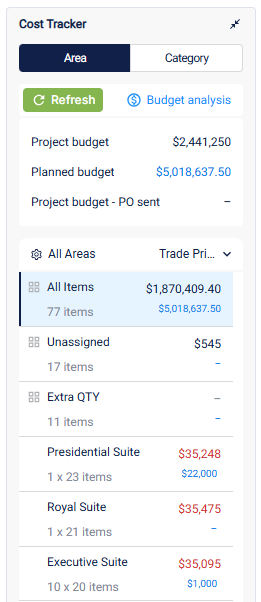
Once quantities and unit costs are in the BOQ, the budget math should be mechanical, not manual. Line totals roll up into category totals (FF&E, OS&E, casegoods, soft costs like freight and installation labor), and those roll up against whatever budget ceiling was set — per room, per category, or for the project overall. The moment specification totals exceed budget, that variance should show up on its own, in real time, not after the purchase orders are already out.
For firms watching margins closely across a project pipeline, 7 Cash Flow Tips for Interior Design Firms covers the budgeting discipline that sits alongside this.
You Don't Have to Start from a Blank Sheet
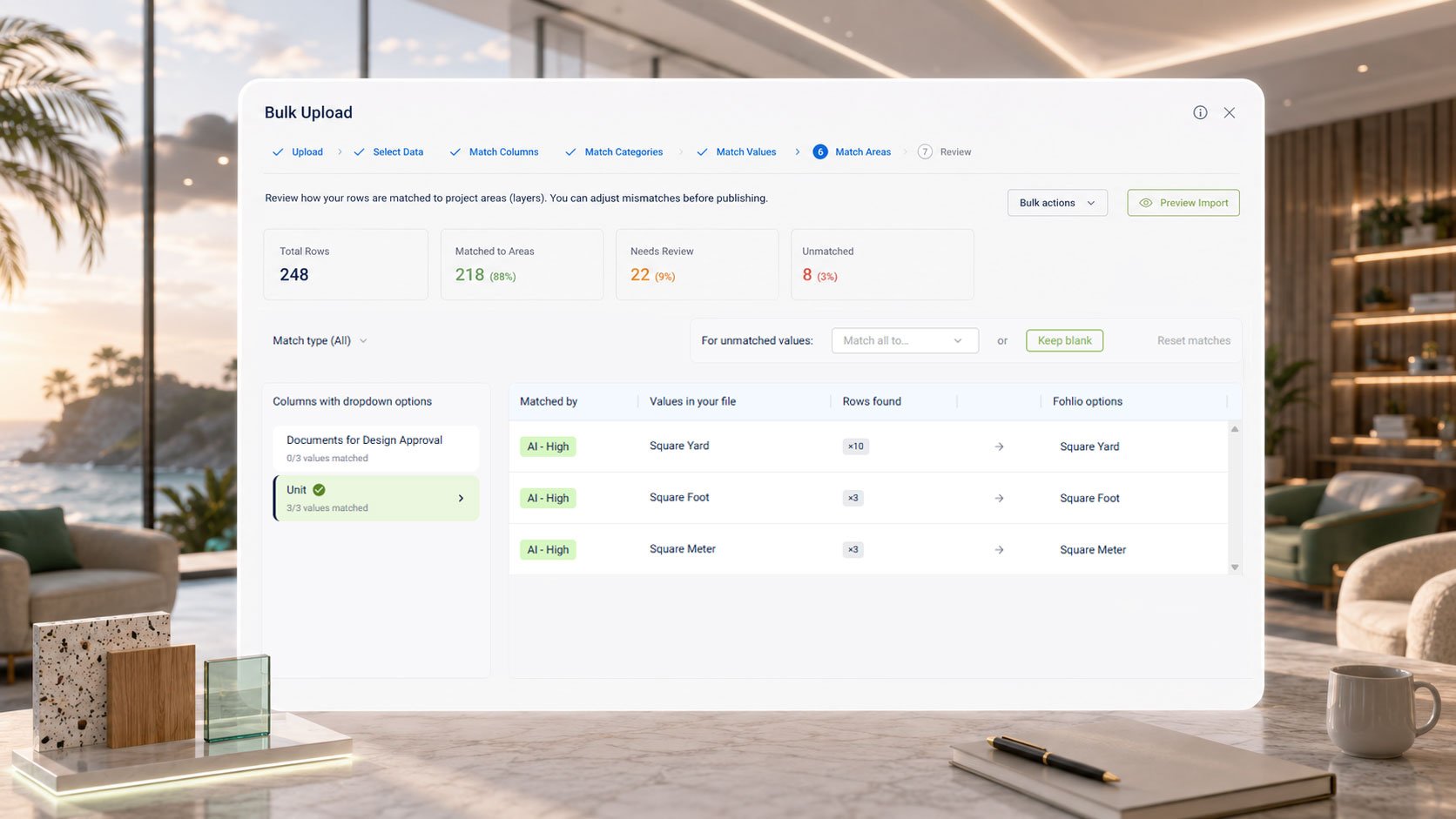
Bringing in a BOQ you've already built. If the spec, quantities, and room breakdown already exist in Excel, that sheet doesn't need to be retyped line by line to live inside a connected BOQ. It gets uploaded and mapped in as a schedule — columns matched to fields once, then imported. This works the same whether the line items are catalog products or fully bespoke, because nothing is being sourced or looked up; it's bringing in rows that are already specified and quantified.
A procurement agent working on a Luxury Collection hotel described the actual, unglamorous version of this problem:
"I must do a BOQ for a Luxury Collection. Most of the items we do not have in Fohlio… Can I upload the excel sheet as is into Fohlio. Otherwise, I will be working on that till I am retired."
The agent above uploaded her sheet. Her follow-up:
"It worked. I can retire NOW😊"
— Procurement Agent, International Enterprise Hospitality Organization, July 2026
Read: Cleaning Up a Spreadsheet Should Happen Before It's in the Project
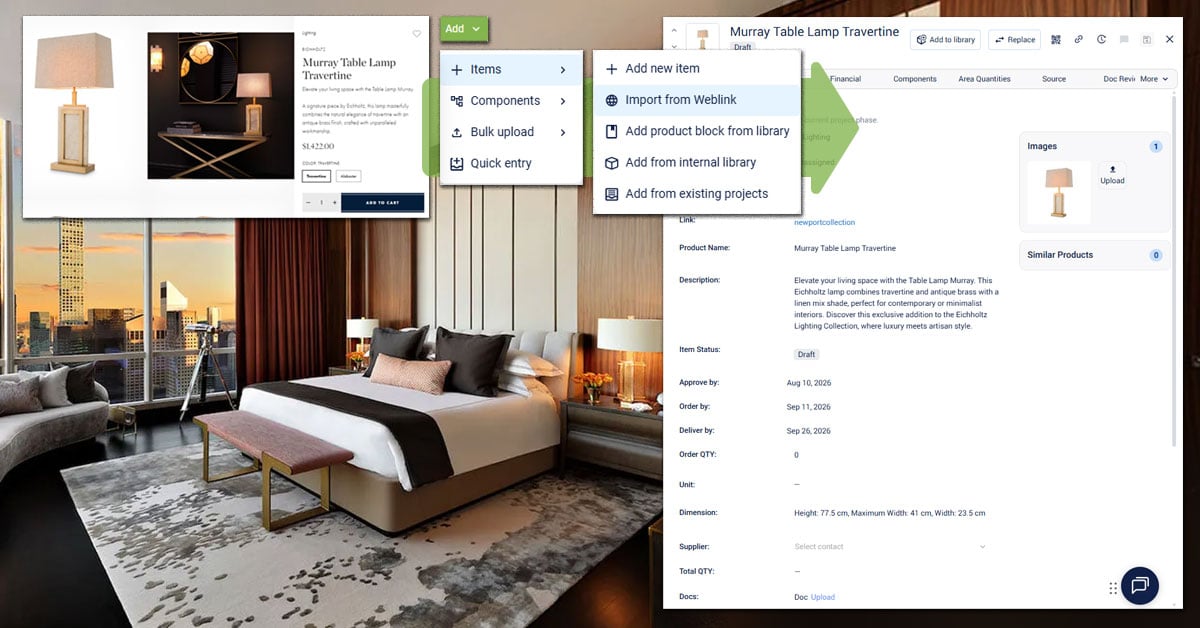
Sourcing a new product from a vendor. That's a separate task from importing an existing sheet — it's what Import from Weblink is built for, pulling name, price, SKU, and dimensions straight from a vendor's product page instead of retyping them. It only applies to items that exist on a vendor site, though — a custom-fabricated headboard or a bespoke millwork piece doesn't have a page to pull from, so those items get built and controlled by hand either way, upload or no upload. On a luxury hospitality project, that's most of the BOQ.
Common Questions
Does a BOQ replace a spec sheet?
No. A spec sheet documents what a product is; a BOQ documents how much of it is needed, at what cost, from which supplier, and how it ships and installs. They're connected, not interchangeable.
Should quantities be counted per room or per product variant?
For projects with repeating room types, group by variant (Corner, View, ADA, and so on) rather than by individual room. A nightstand common to 21 rooms should be one BOQ line with a rolled-up quantity, not 21 separate lines.
What changes in a BOQ after budget approval, and what doesn't?
Quantities should stay fixed unless the room count changes. Specs, finishes, and pricing are what typically move — and each change should be logged with the old value, the new value, the cost impact, and who signed off.
Can an existing Excel BOQ be brought into Fohlio instead of rebuilt?
Yes — an existing sheet can be uploaded and mapped in as a schedule rather than retyped line by line. This is different from clipping a product from a vendor's website: it works for bespoke, catalog, and mixed BOQs alike, since it's importing rows already specified, not sourcing new ones.
Can Interior BOQ Software generate BOQs automatically?
Yes. Modern AI-powered Interior BOQ Software can automate a large portion of the BOQ preparation process, significantly reducing manual work and estimation errors.
Instead of preparing lengthy Excel sheets manually, users can select predefined materials, room types, modular furniture specifications, project categories, and pricing templates. The software then calculates quantities, material costs, labour charges, taxes, and total project value automatically.
Many cloud-based Interior BOQ platforms also generate professional quotations, project estimates, and BOQ reports in PDF or Excel formats. Automation is especially useful for residential apartments, luxury villas, commercial offices, retail stores, restaurants, hotels, and turnkey interior projects.
Although experienced professionals still review final pricing, automation speeds up estimation, improves consistency, and enables businesses to respond to client inquiries much faster than traditional manual methods.
The Takeaway
A BOQ that works for a 50-room hospitality renovation looks less like a spreadsheet and more like a system: one control document for quantities, one set of line items feeding procurement, packaging, and installation views, and one audit trail for every change that happens after budget sign-off. Building that by hand, line by line, is exactly the kind of work that has procurement agents joking about retirement. It doesn't have to be.
Fohlio helps interior designers, architects, turnkey contractors and interior estimation companies move faster — replacing scattered spreadsheets with a single source of truth for every interior project estimation.
From Interior BOQ format and templates to full quantity survey services, our goal is simple: make professional interior estimation and BOQ effortless.
See how an existing FF&E spec sheet fits into a connected BOQ, procurement, and budgeting workflow — explore Fohlio.